AI Cleaner - Phone Cleaner
- 4.3
- Rating
- 10.00M
- Installs
- Free
- Price

 Analysis by App-foxy
I installed AI Cleaner - Phone Cleaner to see whether it could make the unglamorous job of managing phone storage less frustrating. My first impression was that it is aimed at people who want guidance rather than a long list of folders and file types. It is a free tools app from GRIMLAX TRADE, S.L., with a focus on finding unwanted material, reviewing duplicate photos, and making cleanup decisions from one place.
That sounds simple, but a cleaner is only useful if it helps me remove the right things without making me nervous. In everyday use, I found the app most interesting as a repeatable review routine: scan when storage starts getting tight, inspect the suggestions, and delete only what I recognize. It is not a magic button that turns every phone into a new device, and I would not treat an AI recommendation as permission to erase everything automatically.
How I use AI Cleaner without rushing the first scan
The sensible starting point is a baseline check. Before deleting anything, I look at what kind of clutter is actually affecting my phone. A large photo library requires a different approach from a collection of old downloads or temporary files. That distinction matters because a cleaner can identify candidates, but only I know whether a screenshot is disposable, whether a duplicate image is an important edited copy, or whether an old document still has a purpose.
You May Also Like

 Blood Strike: 2.5 Anniversary
Blood Strike’s Loadouts Turn Every Drop Into a Tactical Gamble
A close look at Blood Strike’s custom loadouts: how fast access to signature weapons reshapes its battle royale rhythm, rewards preparation, and narrows the gap between fights.

 Pandora - Music & Podcasts
Pandora’s Music Is Easy to Start, but Harder to Recover
Pandora’s strength is its low-effort path from a seed to a station. Its weak spot is how much confidence it asks you to place in connection, setup, and quiet recovery.

 8 Ball Pool
 Is Built on Rivalries, Rematches, and Routine
A close look at the rivalries, rematches, shared routines, and unanswered safety questions that turn a quick pool match into a persistent mobile community.

 Samsung Music
’s Quiet Strength Is Playing What You Already Own
Its reach comes less from spectacle than from dependable access to a personal library. That simplicity is both the app’s strongest retention engine and its ceiling.

 AccuWeather: Weather Radar
AccuWeather Review: A Quick, Clear Forecast for Everyday Decisions
For everyday plans, the best forecast is the one you can understand quickly. AccuWeather makes rain timing, radar, and local conditions easy to act on, with a few trade-offs.

 Hill Climb Racing
Why Hill Climb Racing Still Turns Crashes Into One More Run
A tiny car, a bumpy hill and one more upgrade: Hill Climb Racing keeps resurfacing because its simple chaos makes every near-miss feel personal.
More From Our News Desk



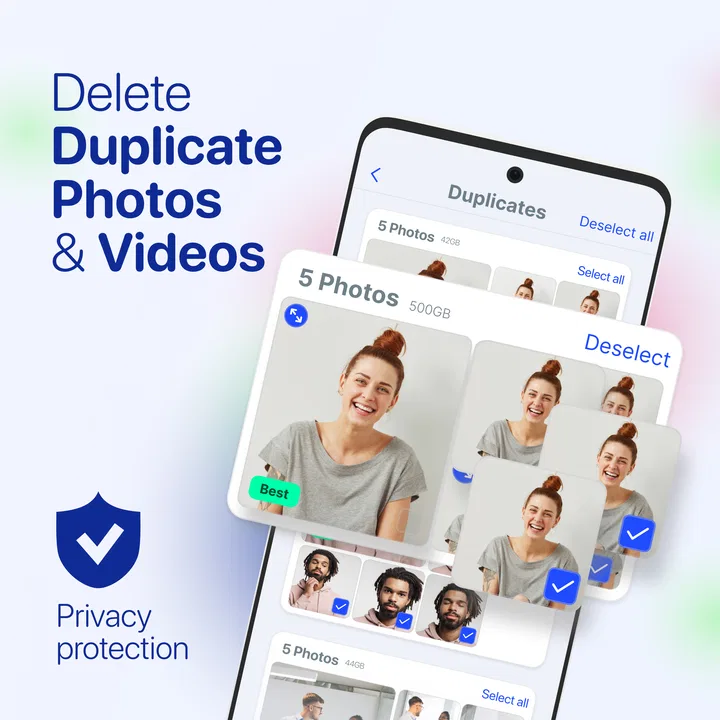
The app’s main appeal is that it brings the cleanup process into a more approachable workflow. Instead of opening several storage locations and comparing images manually, I can use its scanning and review tools to narrow my attention. The AI angle is particularly useful for visual clutter, where similar photos and duplicates are tedious to locate one by one.
I recommend beginning with a small, low-risk category rather than approving every recommendation at once. Duplicate photos are a good example. I can compare the suggested images, keep the sharper or better-framed version, and remove the obvious extras. This creates a cleaner gallery while leaving room to stop if the suggestions do not match my preferences.
A realistic situation is a phone used for travel. After a weekend away, I might have several nearly identical shots of the same view, screenshots of tickets, temporary maps, and images shared in conversations. The useful routine is to review the visual duplicates first, preserve documents and memorable photos, then revisit the remaining categories. That is safer than performing one broad deletion immediately after returning home.
The best habit is review first, delete second. I treat the app as a sorting assistant, not as an authority over my personal files. This approach takes slightly longer, but it greatly reduces the chance of removing something I later need.
What the app does well for photo-heavy phones
Photo cleanup is where this kind of tool can save the most patience. A normal file browser shows names, folders, and sizes, but it does not make visual comparison comfortable. AI Cleaner - Phone Cleaner is more useful when the problem is not merely “large files” but a gallery full of similar images that I no longer want to inspect manually.
I pay attention to near-duplicates rather than assuming every repeated-looking image is disposable. A burst of photos may contain one image with better focus, a different expression, or an important detail in the background. The practical workflow is to open the group, choose the keeper deliberately, and only then confirm removal. If I am uncertain, I leave the group alone and return later.
This also makes the app suitable for people who take many screenshots. Screenshots often become invisible clutter because they are mixed with personal photos and are rarely revisited. I find it easier to judge them in batches: keep travel confirmations, receipts, instructions, and anything needed for work; remove expired references and accidental captures.
There is a trade-off, though. A visual recommendation can be convenient without being perfect for every person’s taste. Two images may look similar to an automated system while having different personal value. Someone who archives every version of a creative project may prefer a manual gallery workflow, while someone who mainly wants to remove accidental repeats will likely benefit more.
Settings and choices worth checking before cleanup
I would not start by tapping through every available action. I first check what the current cleanup screen is asking me to review and whether the suggested items are grouped in a way I understand. The important setting is not a hidden performance switch; it is the level of selectivity I apply before confirming anything. A careful user should make sure the app is showing candidates for review rather than treating recommendations as automatic deletion instructions.
Storage cleanup also works better when I keep personal priorities in mind. If my phone is nearly full, I focus on categories that are both safe to inspect and likely to matter. If storage is comfortable, I can be more selective and avoid deleting files merely because they are old. Freeing space is helpful, but preserving a reliable personal archive is more important than reaching an empty-looking storage screen.
I also consider timing. I avoid a major cleanup immediately before a trip, a presentation, or any situation where I may need a file that has not been backed up elsewhere. A quiet moment gives me time to examine uncertain photos and documents. This is one of those apps where the user’s routine matters as much as the scan itself.
Because the app is rated for Everyone, it is approachable for a broad audience, including family members who may not be comfortable navigating storage menus. Even so, I would still explain the review step to a less technical user. “Recommended” does not mean “personally unimportant,” and a simple explanation prevents overconfidence.
The app is free to install, while in-app purchases range from $4.99 to $79.99 per item. That makes it especially important to look carefully at any upgrade or purchase screen before continuing. I would begin with the free experience, decide whether the scanning and review process genuinely saves time, and only then consider whether additional paid functionality is worthwhile for my usage.
Faster patterns that make the routine easier
Once I know how the recommendations behave, I can make cleanup faster without becoming careless. My preferred pattern is to do one category at a time. I start with obvious duplicates, move to screenshots, and leave ambiguous material until the end. This reduces decision fatigue because I am not constantly switching between photos, files, and other types of clutter.
Another useful pattern is to clean before the phone reaches a crisis point. When storage is completely full, every decision feels urgent, and I am more likely to approve something without checking it. A short review after a busy period—such as a holiday, a home project, or a month of frequent messaging—keeps the task manageable.
I also use a keeper-first mindset. Instead of asking only what can be deleted, I identify the photos and files I definitely want to retain. That makes similar-image suggestions easier to judge. For example, I may keep the original image, the edited version, and the receipt screenshot, while removing blurred attempts and outdated duplicates.
For people who share a phone with family responsibilities, this distinction is valuable. A parent may want to remove repeated images while preserving school notices. A freelancer may want to clear visual clutter but retain every client reference. The app can support both routines, but it cannot know those priorities unless the user applies them during review.
I would also avoid using a cleaner as a substitute for backup. Deleting duplicates can improve organization, but it does not create a second copy of important memories. If an image matters, I make sure it exists somewhere I trust before removing alternatives. This is a general storage habit, but the app’s convenience makes the reminder more important, not less.
Where the AI approach reaches its limits
The word “AI” can create unrealistic expectations. In my view, its value here is reducing the amount of searching and comparison I have to do, not understanding the emotional or practical importance of every file. A recommendation can be technically reasonable and still wrong for me. That is why I never use a broad approval gesture when the contents are personally important.
The app is also not the right choice for every storage problem. If the largest items are essential videos, offline media, application data, or documents that I need to keep, a photo-focused cleanup routine may not solve the underlying issue. In that situation, the phone’s built-in storage screen or a direct file manager can provide a clearer picture of what is consuming space.
Users who want complete manual control may prefer the usual system tools. They are slower for comparing images, but they make the location and type of each file explicit. Conversely, users who dislike browsing folders and mainly need help identifying repeated photos may find this app more comfortable than a traditional file manager.
Privacy-conscious users should also form their own view before scanning personal material. I do not assume that an AI label means the process is risk-free or that every recommendation deserves approval. I read the app’s on-screen explanations and make sure I understand what action I am confirming. That caution is sensible for any tool handling a private gallery.
There is another practical limitation: cleanup can become a loop if I do not change the habits that create clutter. Removing old screenshots today will not prevent new ones tomorrow. The app is most effective when paired with a simple rule, such as reviewing screenshots after a project ends or sorting travel photos before starting the next trip.
Who should install it, and who should skip it?
I think AI Cleaner - Phone Cleaner is a good match for someone whose phone feels disorganized, especially when the main problem is a crowded photo library and repeated images. It is also suitable for users who find built-in storage menus too technical and would rather work through recommendations and visual review.
I would be more cautious recommending it to an archivist, photographer, or anyone who deliberately keeps multiple versions of the same image. Those users may value precision and folder-level control more than speed. A manual workflow can be frustrating, but it makes every decision explicit and may better fit a carefully organized archive.
It can also help a family member who needs a simple cleanup routine, provided someone explains the difference between reviewing and deleting. The Everyone age rating makes the app broadly accessible, but accessibility does not remove the need for sensible file decisions.
The app has reached a 4.3 average from around 154 thousand ratings, with more than 5 million installs and about 4 thousand written reviews. Those figures suggest that it has attracted a substantial audience, but they do not replace my own test of whether its suggestions fit a particular gallery. A cleaner succeeds when it saves time without weakening confidence.
My verdict after building a repeatable workflow
GRIMLAX TRADE, S.L. has made a tools app that is easiest to appreciate when I use it as a guided inspection layer over ordinary storage maintenance. Its strongest role is helping me find visual clutter that would be tedious to compare manually. The combination of scanning, duplicate-photo review, and a more approachable interface can turn an intimidating task into a manageable one.
The current version is 2.0 and requires Android 10 or later. That makes the operating-system requirement worth checking before installation, particularly on an older device. For compatible phones, the free starting point lowers the barrier to testing the workflow, while the in-app purchase range means I would examine any paid option carefully rather than assuming every user needs it.
My recommendation is to install AI Cleaner - Phone Cleaner if you want help sorting repeated photos and everyday junk, then use it in short, deliberate sessions. Start with obvious candidates, protect important files, and do not confuse an automated suggestion with personal knowledge. If your main storage problem is elsewhere or you demand complete manual control, the phone’s built-in tools may be a better fit.
After using it this way, I see the app as a practical assistant rather than a miracle cleaner. It earns its place when it reduces repetitive visual checking and encourages a regular storage habit. It is less convincing when the user expects one tap to understand years of personal files. Used with that distinction in mind, it can make phone maintenance noticeably less tedious while keeping the final decision in my hands.
FAQs for AI Cleaner - Phone Cleaner
01What features does AI Cleaner - Phone Cleaner offer?
AI Cleaner - Phone Cleaner provides a comprehensive suite of features designed to optimize your device's performance. It includes junk file cleaning, RAM boosting, battery saver, and virus protection. The app also features an intelligent AI-based system that learns your usage patterns to enhance cleaning efficiency over time.
02Is AI Cleaner - Phone Cleaner safe to use on my device?
Yes, AI Cleaner - Phone Cleaner is designed with user safety in mind. It employs advanced security protocols to ensure your data remains protected. The app does not access personal files, and all operations are transparently displayed so users know exactly what is being cleaned or optimized.
03How does AI Cleaner - Phone Cleaner improve device performance?
The app improves performance by removing unnecessary files, freeing up RAM, and managing background processes. By doing so, it reduces lag and increases the speed of your device. Additionally, the battery saver feature identifies and limits power-draining apps, extending your phone’s battery life.
04Does AI Cleaner - Phone Cleaner support multiple languages?
Currently, AI Cleaner - Phone Cleaner supports several major languages, including English, Spanish, French, and German. The developers are continually working on adding more languages to accommodate a wider range of users globally. You can check the settings to see the available options.
05Is AI Cleaner - Phone Cleaner compatible with both Android and iOS?
AI Cleaner - Phone Cleaner is available on both Android and iOS platforms. However, some features might vary slightly due to differences in operating system capabilities. Always ensure you download the app from official stores like Google Play or the Apple App Store for the best experience.
Pros
- User-friendly interface for easy navigation.
- Efficient junk file removal saves storage.
- Boosts phone speed with a single tap.
- Customizable cleaning options for flexibility.
- Includes battery saver features.
Cons
- Contains in-app advertisements.
- May require frequent updates.
- Limited features in the free version.
- Access to certain permissions needed.
- Some functions may slow older devices.

AI Cleaner - Phone Cleaner
Gallery